Python is great. It makes everything simple. Also, it can be run almost anywhere, even on your Nokia smartphones. In this post I will show you how to create an installable application (.sis file) from your Python scripts.
The first step is to install Python 2.5 on your computer. It has to be 2.5. If you have a newer version of Python installed, either downgrade to 2.5 or create a local folder with Python 2.5 executable on it and make sure you use that version. You can install Python 2.5 from here.
If you are on Ubuntu, probably you have a newer version of Python. Just get the source and compile it locally:
cd ~
mkdir py2sis
cd py2sis
wget http://www.python.org/ftp/python/2.5.4/Python-2.5.4.tgz
tar -xvzf Python-2.5.4.tgz
rm Python-2.5.4.tgz
cd Python-2.5.4
./configure
make
OK, so now we should have a local copy of Python 2.5.4. To test that everything is fine, run the following command:
~/py2sis/Python-2.5.4/python --version
It should report Python 2.5.4. Windows or Linux users that installed Python 2.5.4 on their entire system can always substitute ~/py2sis/Python-2.5.4/python by just python. For them, the following command should report the same result:
python --version
Now, we need to get the utilities that will allow us to create the sis files. That software is called ensymble. We need exactly this file: ensymble_python2.5-0.27.py
 cd ~/py2sis
wget http://ensymble.googlecode.com/files/ensymble_python2.5-0.27.py
~/py2sis/Python-2.5.4/python ~/py2sis/ensymble_python2.5-0.27.py version
You should get this result: Ensymble v0.27 2008-06-30.
Now let’s get PythonForS60 sis file that will be installed alongside your script. We need the file PythonForS60_1_4_5_3rdEd.sis.
cd ~/py2sis
wget http://sourceforge.net/projects/pys60/files/pys60/1.4.5/PythonForS60_1_4_5_3rdEd.sis/download
mv download PythonForS60_1_4_5_3rdEd.sis
All done configuring the tools. Now we are going to create a Python script.
cd ~
mkdir myFirstScript
cd myFirstScript
gedit default.py &
Here you can put any Python code for Symbian S60. Let’s start with something simple. Write this and save the file:
import appuifw
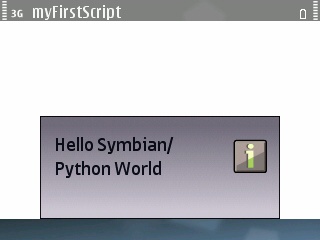
appuifw.note(u"Hello Symbian/Python World", "info")
Time to create your first Python SIS file. Execute the following:
cd ~
~/py2sis/Python-2.5.4/python ~/py2sis/ensymble_python2.5-0.27.py py2sis myFirstScript
It should generate a file called myFirstScript_v1_0_0.sis. This is the sis file for your script. If you already have PythonForS60 sis installed in your phone, it should work. Most of the time though, users will not have it, so let’s merge the two into just one sis:
cd ~
~/py2sis/Python-2.5.4/python ~/py2sis/ensymble_python2.5-0.27.py mergesis myFirstScript_v1_0_0.sis ~/py2sis/PythonForS60_1_4_5_3rdEd.sis myFirstScript_v1_0_0_with_Python.sis
Now, you can just install myFirstScript_v1_0_0_with_Python.sis in your Nokia Symbian S60 3rd edition phone (like the E71 for example) and when you open it, you should see something like this:
Great, so now let’s automate this using a script:
sudo touch /usr/local/bin/py2sis.sh
sudo chmod +x /usr/local/bin/py2sis.sh
sudo gedit /usr/local/bin/py2sis.sh &
Write these commands on the file:
#!/bin/bash
echo "Creating script sis file..."
~/py2sis/Python-2.5.4/python ~/py2sis/ensymble_python2.5-0.27.py py2sis myFirstScript
echo "Merging script sis file with Python for S60 sis file..."
~/py2sis/Python-2.5.4/python ~/py2sis/ensymble_python2.5-0.27.py mergesis myFirstScript_v1_0_0.sis ~/py2sis/PythonForS60_1_4_5_3rdEd.sis myFirstScript_v1_0_0_with_Python.sis
echo "Done."
Now let’s test it erasing the files we just created and then generating them with the script:
cd ~
rm myFirstScript_v1_0_0*
py2sis.sh
It should create the same 2 sis files we just created before manually. Now, let’s edit the script so that we can tell it where is our source code and set other options:
sudo gedit /usr/local/bin/py2sis.sh &
Replace the existing code with this:
#!/bin/bash

#Check that only 1 parameter is passed (the directory of your script)
EXPECTED_ARGS=1
if [ $# -ne $EXPECTED_ARGS ]
then
echo "Usage: `basename $0` [ScriptDirectory]"
exit -1
fi

#This is the directory where your Python for S60 Script is
PYTHON_SCRIPT_DIR=$1

#Application parameters
APP_SCRIPT_SIS_NAME="myApp.sis"
APP_SCRIPT_WITH_PYTHON_SIS_NAME="myApp_with_python.sis"
APP_NAME="My App"
APP_VERSION="1.0.0"
APP_SHORT_CAPTION="Short description."
APP_CAPTION="Here you can describe your application in more detail."
#Icon path. It should be a Tiny SVG compatible icon.
#To add an app icon, just uncomment the following line and edit the path to point to your icon
#APP_ICON=--icon="/path/to/your/icon.svg"

#Environment variables
PYTHON_PATH=~/py2sis/Python-2.5.4/python
ENSYMBLE_PATH=~/py2sis/ensymble_python2.5-0.27.py
PYTHON_FOR_S60_PATH=~/py2sis/PythonForS60_1_4_5_3rdEd.sis

echo "Creating script sis file..."
"${PYTHON_PATH}" "${ENSYMBLE_PATH}" py2sis --appname="${APP_NAME}" --version="${APP_VERSION}" --shortcaption="${APP_SHORT_CAPTION}" --caption="${APP_CAPTION}" ${APP_ICON} "${PYTHON_SCRIPT_DIR}" "${APP_SCRIPT_SIS_NAME}"
echo "Merging script sis file with Python for S60 sis file..."
${PYTHON_PATH} ${ENSYMBLE_PATH} mergesis ${APP_SIS_NAME} ${PYTHON_FOR_S60_PATH} ${APP_SCRIPT_WITH_PYTHON_SIS_NAME}
echo "Done."
There you can set many parameters for your app, like the name, icon, description, and more. Now you should be able to convert your Python scripts to a sis file by just doing this:
py2sis.sh ScriptDirectory
Remember to name the main script default.py since that is the file that ensymble is looking for inside the script folder.
Let’s test this new script, erasing the sis files and then executing this script to generate new sis files:
cd ~
rm myFirstScript_v1_0_0*
py2sis.sh myFirstScript
You should see now a myApp.sis and a myApp_with_python.sis files. Note that those were the properties set in the script. Anytime you want to change these settings, just run this and edit them directly:
sudo gedit /usr/local/bin/py2sis.sh &
OK, now go and create some cool Python apps in no time for your Nokia phone. Check out this excellent Symbian for S60 tutorial made by a fellow Nokia Forum Champion, Jurgen Scheible.